DjangoRESTframework——-请求与响应(Request and Response) 在这一章,我们将真正的开始接触REST framework的核心了。接下来介绍一下几个内建模块。
Request对象 REST framework提供了一个Request对象,它派生自HttpRequest,提供更多弹性的访问数据的序列化操作。它的核心是request.data属性,它类似于request.POST,在Web API中用处很大。
1
2
request.POST #只能处理表单数据,只能在POST方法中起作用 request.data #可以处理任意的数据,能够在POST,PUT,PATCH方法中起作用
Response对象 REST framework提供了Response对象,他是一个TemplateResponse类型的对象,它能够提供未渲染的内容,使用合适的数据类型返回给客户端。
1 return Response(data) #渲染数据给客户端
Status codes 使用数字状态的HTTP响应码,用于不必要的数据读取。它的使用需要非常注意,如果你给出了一个错误的状态码。REST framework为每个状态提供了更明确的状态码,比如HTTP_400_BAD_REQUEST
Wrapping API views REST framework提供了两种wrapper,你可以用来编写API views
1.@api_view 装饰器,用于基于方法的视图
2.APIVIEW类,用于基于类的视图
这些装饰器提供了基本的方法能够确保你收到Request实例,为Reponse对象添加上下文。
这些装饰器也提供一些行为控制,比如返回405 Method Not Allowed在合适的情况下,也能够处理任何ParseError异常,当request.data是非法输入时。
把以上的内容拼起来复习一下,Pulling it all together 好了,现在我们可以使用这些新组件来编写view了。我们不需views.py中引入JSONResponse类,删掉它,继续coding。
1
2
3
4
5
6
7
8
9
10
11
12
13
14
15
16
17
18
19
from rest_framework import statusfrom rest_framework.decorators import api_viewfrom rest_framework.response import Responsefrom snippets.models import Snippetfrom snippets.serializers import SnippetSerializer@api_view(['GET' , 'POST' ] ) def snippet_list (request ): if request.method == 'GET' : snippet = Snippet.objects.all () serializer = SnippetSerializer(snippets, many=True ) return Reponse(serializer.data) elif request.method == 'POST' : serializer = SnippetSerializer(data=request.data) if serializer.is_valid(): serializer.save() return Response(serializer.data, status=status.HTTP_201_CREATED) return Response(serializer.errors, status=status.HTTP_400_BAD_REQUEST)
现在的视图与之前相比,显得更加简洁了一些,看起来和Forms API看起来也非常相似。我们也使用了status codes,使我们返回的意义更加明确。下面是snippet的详细视图,对应的文件是views.py:
1 2 3 4 5 6 7 8 9 10 11 12 13 14 15 16 17 18 19 20 21 22 23 24 @api_view(['GET' , 'PUT' , 'DELETE' ] ) def snippet_detail (request, pk ): """ Retrieve, update or delete a code snippet. """ try : snippet = Snippet.objects.get(pk=pk) except Snippet.DoesNotExist: return Response(status=status.HTTP_404_NOT_FOUND) if request.method == 'GET' : serializer = SnippetSerializer(snippet) return Response(serializer.data) elif request.method == 'PUT' : serializer = SnippetSerializer(snippet, data=request.data) if serializer.is_valid(): serializer.save() return Response(serializer.data) return Response(serializer.errors, status=status.HTTP_400_BAD_REQUEST) elif request.method == 'DELETE' : snippet.delete() return Response(status=status.HTTP_204_NO_CONTENT)
这看起来就更加熟悉了,和一般的Django视图区别不大。
注意:我们不再明确的指定request和response中的内容类型,request.data能够帮我们处理传入的json格式的请求数据,但是它也能给处理其他类型的格式。类似地,我们能返回响应对象数据,允许REST framework用合适的数据类型渲染响应。
给我们的URLs添加可选的格式前缀 利用这一优点,我们的响应内容不再硬生生的绑定单一的内容格式,而可以支持格式前缀,定义我们需要返回的格式。比如http://example.com/api/items/4.sjon .
要达到这个目的的话,需要给添加一个format参数,就像这样:
1 def snippet_list (request, format =None )
1 def snippet_detail (request, pk, format =None )
现在需要更新urls.py,追加format_suffix_patterns
1
2
3
4
5
6
7
8
9
10
11
from django.conf.urls import urlfrom rest_framework.urlpatterns import format_suffix_patternsfrom snippets import viewsurlpatterns = [ url(r'^snippets/$' , views.snippet_list), url(r'^snippets/(?P<pk>[0-9]+)$' , views.snippet_detail), ] urlpatterns = fromat_suffix_patterns(urlpatterns)
我们就不再需要添加其他额外的url策略,就能够给我们一个清晰,简洁的支持指定需要的响应格式。
应用跑起来是怎样的呢? 我们可以和之前一样列出所有的snippets
1
2
3
4
5
6
7
8
9
10
11
12
13
14
15
16
17
18
19
20
21
22
23
24
25
26
27
28
29
30
31
32
33
34
35
36
PS E:\Study\Serializer_tutorial\tutorial> http http://127.0.0.1:8000/snippets/ HTTP/1.0 200 OK Allow: POST, OPTIONS, GET Content-Length: 319 Content-Type: application/json Date: Tue, 10 Oct 2017 07:52:59 GMT Server: WSGIServer/0.1 Python/2.7.13 Vary: Accept, Cookie X-Frame-Options: SAMEORIGIN [ { "code": "foo = \"bar\"\n", "id": 1, "language": "python", "linenos": false, "style": "friendly", "title": "" }, { "code": "print \"hello, world\n\"", "id": 2, "language": "python", "linenos": false, "style": "friendly", "title": "" }, { "code": "print \"hello, world\n\"", "id": 3, "language": "python", "linenos": false, "style": "friendly", "title": "" } ]
我们也可以控制返回的格式,利用HTTP头或者格式前缀。
1
2
3
4
5
6
7
8
9
10
11
12
13
14
15
16
17
18
19
20
21
22
23
24
25
26
27
28
29
30
31
32
33
34
35
36
37
38
39
40
41
42
43
44
45
46
47
48
49
50
51
52
53
54
55
56
57
58
59
60
61
62
63
64
65
66
67
68
69
70
71
72
73
74
75
76
77
78
79
80
81
82
83
84
85
86
87
88
89
90
91
92
93
94
95
96
97
98
99
100
101
102
PS E:\Study\Serializer_tutorial\tutorial> http http://127.0.0.1:8000/snippets/ Accept:application/json HTTP/1.0 200 OK Allow: POST, OPTIONS, GET Content-Length: 319 Content-Type: application/json Date: Tue, 10 Oct 2017 07:54:19 GMT Server: WSGIServer/0.1 Python/2.7.13 Vary: Accept, Cookie X-Frame-Options: SAMEORIGIN [ { "code" : "foo = \"bar\"\n" , "id" : 1, "language" : "python" , "linenos" : false , "style" : "friendly" , "title" : "" }, { "code" : "print \"hello, world\n\"" , "id" : 2, "language" : "python" , "linenos" : false , "style" : "friendly" , "title" : "" }, { "code" : "print \"hello, world\n\"" , "id" : 3, "language" : "python" , "linenos" : false , "style" : "friendly" , "title" : "" } ] PS E:\Study\Serializer_tutorial\tutorial> http http://127.0.0.1:8000/snippets/ Accept:text/html HTTP/1.0 200 OK Allow: POST, OPTIONS, GET Content-Length: 7647 Content-Type: text/html; charset=utf-8 Date: Tue, 10 Oct 2017 07:54:50 GMT Server: WSGIServer/0.1 Python/2.7.13 Vary: Accept, Cookie X-Frame-Options: SAMEORIGIN <!DOCTYPE html> <html> <head > <meta http-equiv="Content-Type" content="text/html; charset=utf-8" /> <meta name="robots" content="NONE,NOARCHIVE" /> <title>Snippet List – Django REST framework</title> PS E:\Study\Serializer_tutorial\tutorial> http http://127.0.0.1:8000/snippets.json HTTP/1.0 200 OK Allow: POST, OPTIONS, GET Content-Length: 319 Content-Type: application/json Date: Tue, 10 Oct 2017 07:55:25 GMT Server: WSGIServer/0.1 Python/2.7.13 Vary: Accept, Cookie X-Frame-Options: SAMEORIGIN [ { "code" : "foo = \"bar\"\n" , "id" : 1, "language" : "python" , "linenos" : false , "style" : "friendly" , "title" : "" }, { "code" : "print \"hello, world\n\"" , PS E:\Study\Serializer_tutorial\tutorial> http http://127.0.0.1:8000/snippets.api HTTP/1.0 200 OK Allow: POST, OPTIONS, GET Content-Length: 7668 Content-Type: text/html; charset=utf-8 Date: Tue, 10 Oct 2017 07:55:42 GMT Server: WSGIServer/0.1 Python/2.7.13 Vary: Accept, Cookie X-Frame-Options: SAMEORIGIN <!DOCTYPE html> <html> <head > <meta http-equiv="Content-Type" content="text/html; charset=utf-8" /> <meta name="robots" content="NONE,NOARCHIVE" /> <title>Snippet List – Django REST framework</title>
同时,我们可以控制请求数据的格式,利用Content-type头。
1
2
3
4
5
6
7
8
9
10
11
12
13
14
15
16
17
18
19
20
21
22
23
24
25
26
27
28
29
30
31
32
33
34
35
36
37
PS E:\Study\Serializer_tutorial\tutorial> http --form POST http://127.0.0.1:8000/snippets/ code="print 123" HTTP/1.0 201 Created Allow: POST, OPTIONS, GET Content-Length: 93 Content-Type: application/json Date: Tue, 10 Oct 2017 07:58:55 GMT Server: WSGIServer/0.1 Python/2.7.13 Vary: Accept, Cookie X-Frame-Options: SAMEORIGIN { "code": "print 123", "id": 4, "language": "python", "linenos": false, "style": "friendly", "title": "" } PS E:\Study\Serializer_tutorial\tutorial> http --json POST http://127.0.0.1:8000/snippets/ code="print 456" HTTP/1.0 201 Created Allow: POST, OPTIONS, GET Content-Length: 93 Content-Type: application/json Date: Tue, 10 Oct 2017 07:59:24 GMT Server: WSGIServer/0.1 Python/2.7.13 Vary: Accept, Cookie X-Frame-Options: SAMEORIGIN { "code": "print 456", "id": 5, "language": "python", "linenos": false, "style": "friendly", "title": "" }
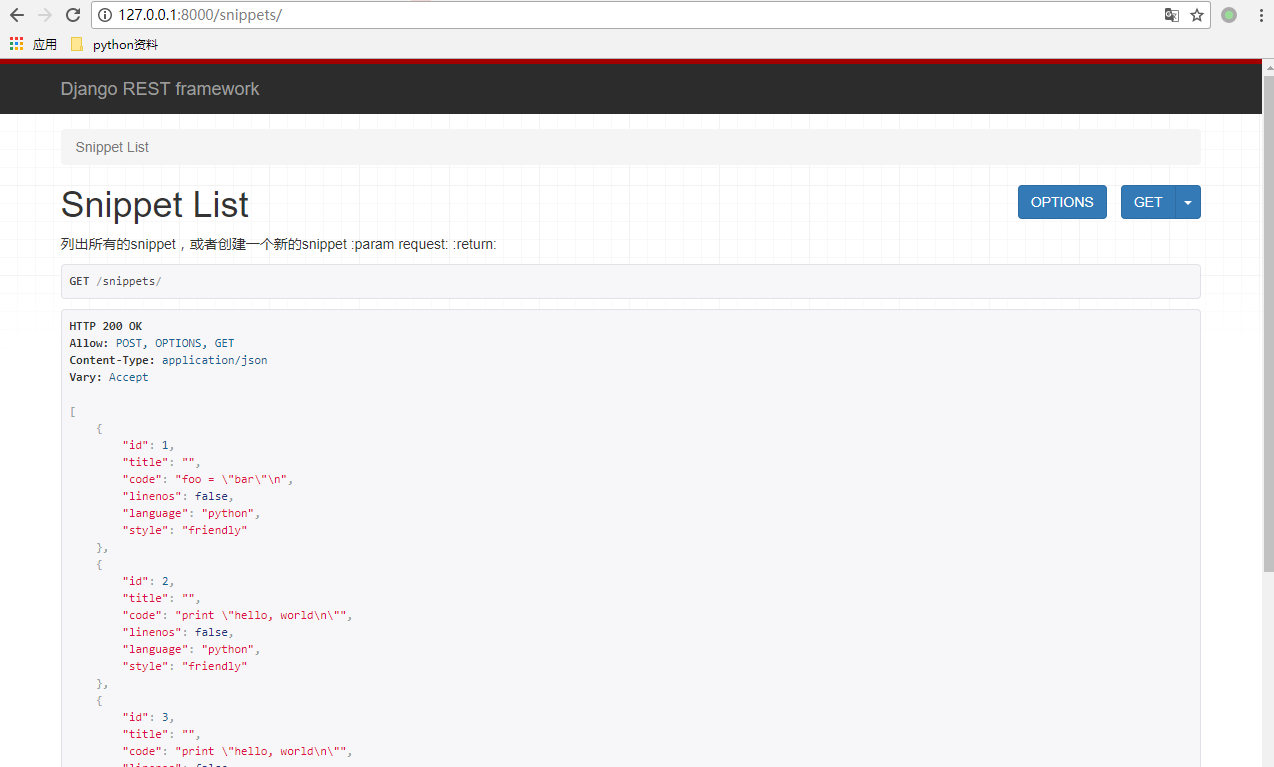
可视化 由于API可以根据客户端的请求选择合适的响应类型。因此当接收到来自浏览器的请求时,会默认以html的格式响应请求。这可以让api能够返回,用于网页浏览。可视化之后,用浏览器开发和使用api将变得十分方便。所以现在用浏览器查看是这个画风: